Beginner12 min read
The Complete AI Automation Starter Guide
Everything you need to go from zero to your first running automation — no coding required. Covers the core concepts, the right tools, and a step-by-step launch checklist.
Read guide →Generic automation advice only gets you so far. The workflows that save a real estate agent 8 hours a week are different from the ones that matter most for a marketing agency or a law firm. This guide breaks down the highest-leverage automation opportunities by industry, with specific workflows and tools for each.
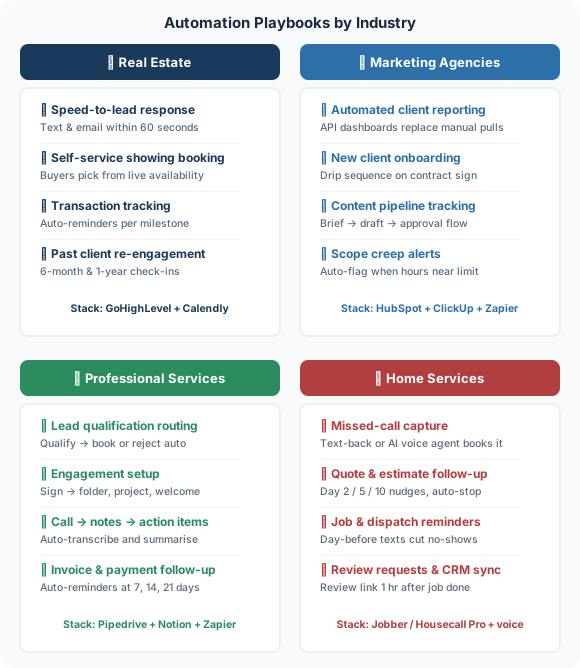
Speed-to-lead response: New leads from any source (website, Zillow, Realtor.com, social ads) trigger an immediate text and email within 60 seconds. The message is personalized to the property or area they inquired about. A follow-up sequence continues for 10 days if they don't respond. Implementation: Zapier + your CRM + SMS tool (Twilio or a CRM with built-in SMS).
Showing coordination: Replace manual back-and-forth scheduling with a self-service booking page where buyers pick from available windows that sync with your calendar. Confirmations and reminders go automatically. Implementation: Calendly or NylasCal + calendar integration.
Transaction milestone tracking: When a deal goes under contract, an automated checklist activates — each item has a responsible party and a deadline. Missing deadlines trigger automated reminders to the right person. Implementation: CRM workflow + task management integration.
Client communication cadence: Past clients receive automated check-ins at 6 months, 1 year, and 2 years post-closing — asking how they're settling in and offering a free market update. Implementation: CRM drip sequence with personalization tokens.
GoHighLevel (all-in-one CRM + automation) or Follow Up Boss + Zapier + Calendly. Most top real estate teams settle on an all-in-one like GoHighLevel because the native integrations reduce the automation complexity significantly.
For a deeper look at what this saves in practice, see AI Tools for Real Estate Teams.
Client reporting: Pull data from all ad platforms, analytics tools, and SEO trackers into a single dashboard automatically. Reports populate themselves; the account manager's job shifts from data compilation to analysis and recommendations. Implementation: Databox or AgencyAnalytics + API connections to each platform.
New client onboarding: When a contract is signed, an automated sequence delivers welcome documents, intake forms, access request instructions, and kickoff call scheduling — in a structured drip over the first 72 hours. Nothing falls through the cracks. Implementation: CRM workflow + DocuSign + Calendly.
Content production pipeline: Brief → AI first draft → internal review → client approval → scheduling — each stage has automated handoffs and status tracking. Team members get notified when something lands in their queue; clients get notified when something needs their review. Implementation: Notion or ClickUp workflow + Slack notifications + content scheduling tool.
Scope creep detection: Time tracking data is compared against retainer scope automatically each week. If an account is tracking over scope, the account manager is notified before the billing conversation becomes awkward. Implementation: Harvest or Toggl + Zapier + Slack alert.
HubSpot (CRM + email) + ClickUp (project management) + AgencyAnalytics (reporting) + Zapier (connective tissue). Slack for internal notifications. ChatGPT/Claude for content first drafts.
This is close to what we found and fixed at a 10-person marketing agency losing 47 hours a week — worth reading if reporting and proposal generation are eating your team's time too.
Lead qualification and scheduling: Discovery call requests trigger a brief qualification questionnaire. Answers determine whether the lead is routed to a direct booking link, a junior team member, or a "not a fit" email sequence. No time wasted on unqualified calls. Implementation: Typeform + Zapier + conditional routing + Calendly.
Engagement setup: New engagement signed → automatically generate folder structure in cloud storage, create project in task manager, send welcome sequence, schedule kickoff call, set up billing. All of this happens before you've manually done a single thing. Implementation: PandaDoc or DocuSign + Zapier + Google Drive + ClickUp + Stripe.
Knowledge management: Call and meeting recordings are automatically transcribed, summarized, and added to the client's file in Notion or a CRM. Key decisions, action items, and open questions are extracted. Institutional knowledge stays in the system, not in someone's head. Implementation: Otter.ai or Fireflies + Zapier + Notion.
Invoice and payment follow-up: Invoices generate and send automatically on a schedule. Overdue invoices trigger a polite automated reminder at 3 days, 7 days, and 14 days — escalating in tone. Implementation: QuickBooks or FreshBooks + built-in automation or Zapier.
HubSpot or Pipedrive (CRM) + PandaDoc (proposals/contracts) + Calendly (scheduling) + Notion (knowledge base) + QuickBooks (billing) + Zapier (connections). For solo practitioners, a simpler stack — GoHighLevel alone covers most of this in one platform.
Real examples from accounting practices: replacing a 12-page paper intake form and a self-serve client portal for e-signing, payments, and document upload.
Missed-call and after-hours capture: Home services is a phone business — the caller with the burst pipe hires whoever picks up first. Every missed call fires an instant text-back ("Sorry we missed you — what's going on, and what's your address?"), or an AI voice agent answers, collects the details, checks the calendar, and books the slot. Either way the lead never reaches the next company on the list. Implementation: a field-service platform with missed-call text-back, or an AI voice agent (Retell / Vapi) connected to your scheduling calendar.
Quote and estimate follow-up: An estimate with no response triggers a short check-in at day 2, day 5, and day 10 — plain, friendly, not a hard sell. The sequence stops the moment the customer replies or books. Recovers 10–20% of quotes that would otherwise go silent. Implementation: CRM drip sequence or Zapier + SMS tool, triggered off estimate status.
Job and dispatch reminders: The customer gets a text when the job is booked, a reminder the day before with the arrival window, and an "on our way" ETA when the tech leaves the previous job. Rescheduling happens in the thread. Cuts no-shows and wasted truck rolls. Implementation: field-service platform notifications or Zapier + calendar + SMS.
Review generation and CRM sync: One hour after a job is marked complete, the customer gets a thank-you text with a direct review link — sent every time, no effort. The same trigger updates the contact record with the work done, date, and amount, so seasonal follow-ups (tune-ups, filter changes, gutter cleaning) can run on their own later. Implementation: field-service platform + review tool (NiceJob, Podium) or Zapier + Google review link.
Housecall Pro, Jobber, or ServiceTitan (all-in-one field-service management: scheduling, dispatch, invoicing, and most of the notifications above) + an AI voice agent or missed-call text-back layer for call capture + Zapier for anything the platform doesn't do natively. Solo operators can start with Jobber alone and add the voice layer once call volume justifies it.
For the business case and the missed-call math behind this stack, see AI Automation for Home Services Businesses.
Regardless of industry, these automations deliver consistently high ROI:
Start with these four, regardless of your industry. Then layer on the industry-specific workflows as you build automation fluency.
Book a free audit and we'll map the exact automations right for your business.
Get free time audit →Everything you need to go from zero to your first running automation — no coding required. Covers the core concepts, the right tools, and a step-by-step launch checklist.
Read guide →A practical, day-by-day framework for mapping where your team's time actually goes — and identifying the highest-leverage automation opportunities.
Read guide →A hands-on walkthrough for building a complete lead capture → CRM → follow-up email workflow using Zapier, without writing a single line of code.
Read guide →