Stop Automating the Wrong Things
Most automation projects fail not because the tools are bad, but because teams automate broken processes. Here's the framework that actually sticks.
March 15, 20256 min read
Read article →Home services is a phone business. Someone's furnace quits, a pipe bursts, a tree comes down on the driveway — and they call the first company that picks up. If that's not you, it's the next name on their list. The work that decides whether you win that job isn't skilled trade work: it's answering fast, following up on the quote, and showing up when you said you would. That's also exactly the work that falls apart when you're on a ladder, under a sink, or driving between jobs.
This is the same pattern we covered for real estate teams — a relationship-driven business where most of the week goes to admin that doesn't require the owner's expertise. For contractors, HVAC and plumbing shops, electricians, roofers, landscapers, and cleaning companies, here are the four automations that plug the biggest leaks, and how to approach each one without writing a line of code.
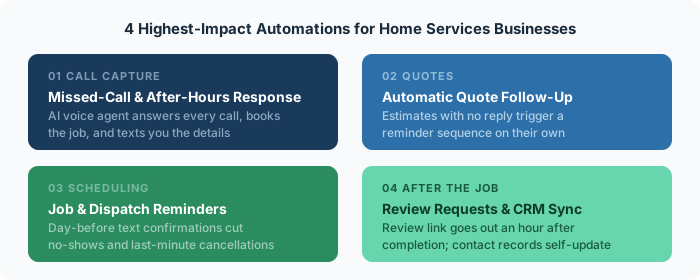
Do the math on one missed call. If your average job is worth $600 and you close half the qualified callers who reach you, every call that goes to voicemail and doesn't call back is worth about $300 in expected revenue. Most home services businesses miss 20–30% of inbound calls during a busy week, and a large share of those callers never leave a message — they just dial the next company.
The fix is a system that responds to every call whether or not you can pick up. At its simplest, a missed call triggers an automatic text within seconds: "Sorry we missed you — this is [Company]. What's going on, and what's your address? We'll get right back to you." That single message keeps the caller from moving on, and it turns a lost call into a text thread you can handle between jobs.
The stronger version is an AI voice agent that actually answers. It picks up on the first ring, asks what the problem is, collects the address and contact details, checks your calendar for the next open slot, books the appointment, and texts you a summary — day or night. Callers get a real conversation instead of a beep, and you get a booked job on the schedule instead of a voicemail to return. We've built this exact setup for service businesses, and it's the single highest-return automation in this list because it recovers revenue you're losing right now without knowing the size of it.
You visit the property, scope the work, send the estimate — and then the follow-up depends on you remembering to check in three days later, while you're already onto the next ten jobs. Most estimates that don't close simply never get a second touch. The customer wasn't a no; they got busy, compared you to one other quote, and the decision slid off their plate.
An automated follow-up sequence handles this without you tracking anything. When an estimate goes out and there's no response, the system sends a short check-in at day 2, another at day 5, and a final one at day 10 — each one a plain, friendly message, not a hard sell. If the customer replies or books, the sequence stops on its own. Home services businesses that add structured quote follow-up routinely recover an extra 10–20% of estimates that would otherwise have gone silent, which on a normal month of quoting is a meaningful number.
A no-show or a same-day cancellation is a wasted truck roll — fuel, drive time, and a slot you could have given someone else. A lot of them come down to the customer simply forgetting, or not writing down the window you gave them over the phone two weeks ago.
Automated confirmations fix most of it. The customer gets a text when the job is booked, a reminder the day before with the arrival window, and an "on our way" message with an ETA when the tech leaves the previous job. Rescheduling can happen right in that thread without a phone call. The same system can nudge your side too — flagging jobs that still need a confirmed time, or a tech who hasn't marked yesterday's work complete. Fewer wasted drives, fewer surprised customers, and a schedule that reflects reality.
For a local home services business, your position in the map results is close to the whole game, and that ranking is driven heavily by a steady flow of recent reviews. Most owners know this and still don't ask consistently, because asking means remembering to text each customer a day later — and that's the first thing to go when you're slammed.
Automate the ask. An hour after a job is marked complete, the customer gets a thank-you text with a direct link to leave a review. One message, sent every time, with no effort from you. Teams that turn this on typically go from a handful of reviews a year to a few every week, and the compounding effect on map ranking is hard to overstate.
The same trigger keeps your customer records current. When a job closes, the contact updates automatically with the work performed, the date, and the amount — so six months later, when that furnace needs a part, you have the history instead of a vague memory. Accurate records also make seasonal follow-up campaigns — tune-ups, filter changes, gutter cleaning — something the system can run for you.
Don't try to automate all four at once. Start with missed-call response — it's the highest-leverage area, it recovers money you're losing today, and you'll see booked jobs come through it within the first week. Once that's running reliably, add quote follow-up, then job reminders, then review requests. Built in that order, each layer compounds on the last, and the combined effect is a business that captures every lead, follows up on every quote, and shows up on time — without the owner holding all of it in their head.
The mistake to avoid is automating a process that's already a mess. If your intake is inconsistent or your scheduling lives in three places, tighten that up first — the Audit → Optimize → Automate framework walks through why that order matters. For the full stack across home services and other industries, see our industry automation playbooks, and if you'd rather start with a first build, the AI Automation Starter Guide covers it step by step, no coding required.
Not sure which leak is costing you the most? That's what a free discovery call is for — we'll map where jobs are slipping through and tell you honestly what's automatable in your business. No pitch, just clarity.
Roughly the value of one job per missed call. If your average ticket is $600 and you close half the callers who reach you, every missed call that doesn't call back is about $300 in expected revenue gone. Miss 20–30% of calls in a busy week and it adds up fast.
A live answering service takes a message; an AI voice agent books the job. If the goal is capturing after-hours and overflow calls without playing phone tag, an AI voice agent that checks your calendar and schedules the appointment usually wins. An answering service still leaves you a callback list to work through.
Missed-call and after-hours response. It recovers revenue you're losing right now, and you'll see booked jobs come through it within the first week. Once that runs reliably, add quote follow-up, then job reminders, then review requests — each layer builds on the last.
Usually not. Most of these automations connect to what you already use — Jobber, Housecall Pro, ServiceTitan, or a calendar and a CRM. The goal is to wire the tools together so calls, quotes, reminders, and reviews flow automatically, not to rip out a system your team already knows.
A single automation like missed-call response or review requests is typically live within a week or two. The full four-layer stack is usually staged over a few weeks so each piece is tested before the next goes in. You don't have to build all of it at once to see results.
Get your free time audit—we'll map exactly where your team is losing hours.
Get free time audit →Most automation projects fail not because the tools are bad, but because teams automate broken processes. Here's the framework that actually sticks.
A 10-person agency was losing 47 hours a week to manual work they didn't even know was automatable. Here's what we found—and fixed.
There are 5 predictable reasons automation projects fail. Most teams hit all 5. Here's how to avoid every one of them.