Stop Automating the Wrong Things
Most automation projects fail not because the tools are bad, but because teams automate broken processes. Here's the framework that actually sticks.
March 15, 20256 min read
Read article →If a past automation project stalled, got abandoned, or never delivered the time savings you were promised, it wasn't the tool's fault. It's one of five predictable, avoidable mistakes—and after working through hundreds of automation implementations, we've learned to spot which one (or which combination) sank a given project just by hearing how it went. Run your last project against this list. Chances are, you'll recognize it in the first two.
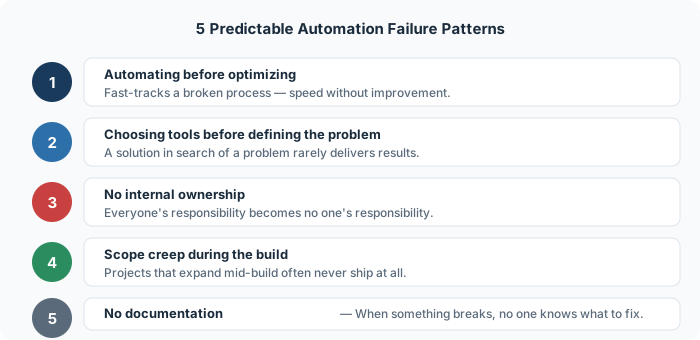
The mistake: Taking a broken or inefficient process and automating it exactly as it exists. Teams get excited about the tooling before questioning the underlying workflow.
The fix: Map the process before touching any tool, and cut anything that doesn't add measurable value. This is the single most common failure pattern we see, and it's big enough to deserve its own full walkthrough—read the Audit → Optimize → Automate framework for the complete playbook, or the agency case study that shows exactly what this mistake costs in hours.
The mistake: Someone reads about a tool, gets excited, and reverse-engineers a use case for it. The tool becomes the solution looking for a problem—which almost always ends in underdelivery.
The fix: Define the problem in concrete terms first. "We spend 8 hours per week manually entering contact form submissions into our CRM" is a problem definition. "We should use Zapier" is not. When you start with a specific, measurable problem, tool selection becomes obvious rather than speculative.
The mistake: The automation gets built but no one person owns its ongoing health. When something breaks or needs updating, it becomes everyone's problem—which means it becomes no one's problem.
The fix: Before any automation goes live, assign a named owner. This person doesn't need to be technical—they just need to be accountable. They monitor the automation, catch when it breaks, and know who to contact when it needs to change. Without ownership, even great automations decay silently.
The mistake: The initial project was to automate one workflow. Halfway through, someone says "while we're in here, can we also…" and the scope expands. Complexity compounds, timelines slip, and often the project stalls entirely before delivering anything.
The fix: Define a minimum viable automation—the smallest version that delivers meaningful value—and build that first. Ship it. Let it run. Then expand based on what you learn. Shipping a narrow automation that works beats a comprehensive one that never launches.
The mistake: The automation works perfectly—until the person who built it leaves, or something changes in an upstream tool, or a new team member needs to understand how data flows. Because nothing was documented, troubleshooting takes three times as long as it should.
The fix: Document every automation before marking it complete. One page is enough: what it does, what triggers it, what tools it touches, and what to check if it breaks. Store it somewhere the whole team can find it. This step takes 30 minutes and saves hours later.
All five failure patterns share a root cause: moving too fast. The urgency to start building often crowds out the thinking that makes the build worthwhile. Slow down at the start—define the problem, clean up the process, assign ownership, constrain the scope, and document as you go—and the implementation becomes the easy part. Notice that none of these five patterns are actually about the tools—they're about judgment, which is the same thing that separates who gets ahead with AI and who doesn't.
Get your free time audit—we'll map exactly where your team is losing hours.
Get free time audit →Most automation projects fail not because the tools are bad, but because teams automate broken processes. Here's the framework that actually sticks.
A 10-person agency was losing 47 hours a week to manual work they didn't even know was automatable. Here's what we found—and fixed.
Real estate teams spend 60% of their time on follow-up, scheduling, and admin. Here's the exact automation stack that reclaims it.